



The OIC website provides access to all decisions and decisions notes of the Information Commissioner and Supreme Court Decisions in relation to the Freedom of Information Act 1992 (WA) (FOI Act). The decisions on the OIC website are indexed by year.
The decisions and decisions notes of the Information Commissioner and Supreme Court Decisions relating to the FOI Act are also published on the Australian Legal Information Institute (AustLII). This guide explains how to search the AustLII databases for decisions of the Information Commissioner.
Step 1 – Access the WA Information Commissioner section of the AustLII database
Show moreThe following link takes you to the decisions of the Western Australian Information Commissioner
You are in the correct part of the AustLII database if the heading is Western Australian Information Commissioner.

Step 2 – Choose what decisions you want to see
Show moreChoose your entry point for searching for decisions. The existing filters available for selection are:
Most Recent
Default view: Lists the most recent cases added, by date of the case.
Most Cited
Lists the cases most cited by subsequent documents.
Most Accessed
Lists the popular (‘most accessed’) cases.
Year
Select the Specific Year to see all the decisions in that year.
Starts with
Select the first letter of the decision you are looking for.

Step 3 – Search using the search tool in the right-hand corner
Show more
- You can search for references to:
Particular clauses of the FOI Act
For example - “clause 3” - Use inverted commas around the clause you are interested in. You can be more specific – eg “clause 3(3)”.
Particular sections of the FOI Act
For example - “section 26” - Use inverted commas around the section you are interested in. You can be more specific – eg “section 26(2)”.
Particular words
For example - dog – you do not need to use inverted commas around a single word – see below for more information about searching for the combination of a number of words.
Particular phases
For example - “could reasonably be expected to” - include inverted commas around the exact phrase you are looking for.
Agency or party names
For example – “Department of Mines” - include inverted commas around the exact agency name or individual name you are looking for.
Tip – for agencies, using the inverted commas will only get you the decisions related to the agency with that name. If the agency has changed names, search for the parts of the agency name that have been retained over various names of the Department – For example – ‘mines’.
Tip – for individuals only use the last name as some decision will not mention a party's full name.
Combinations of all of the above
See below for doing a search on multiple clauses, sections, words and or phrases at the one time.
Searching with multiple search terms
You can search for multiple search terms using Boolean Logic – you can use some simple tools to do basic Boolean searches.
- Use inverted commas around any exact combination or words of phrases – eg “section 26” or “personal information”
- Use ‘And’ between the words or phrases if you want both of the words or phrases to appear in the decision
For example – Dog and “clause 3” and “fine”
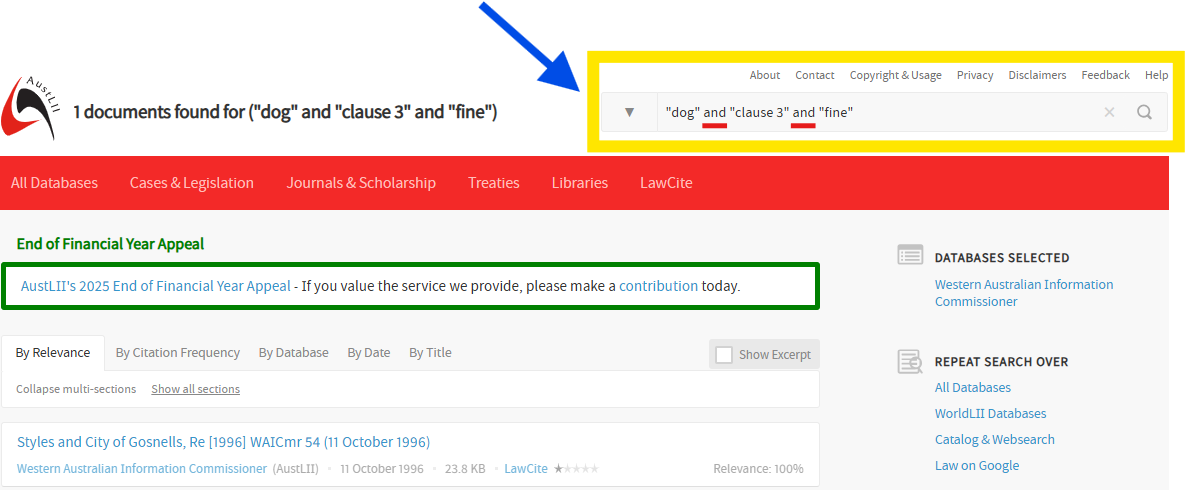
3. Use ‘NOT’ before the words or phrases you do not want to see in decision
For example – Dog and “clause 3” not “fine”
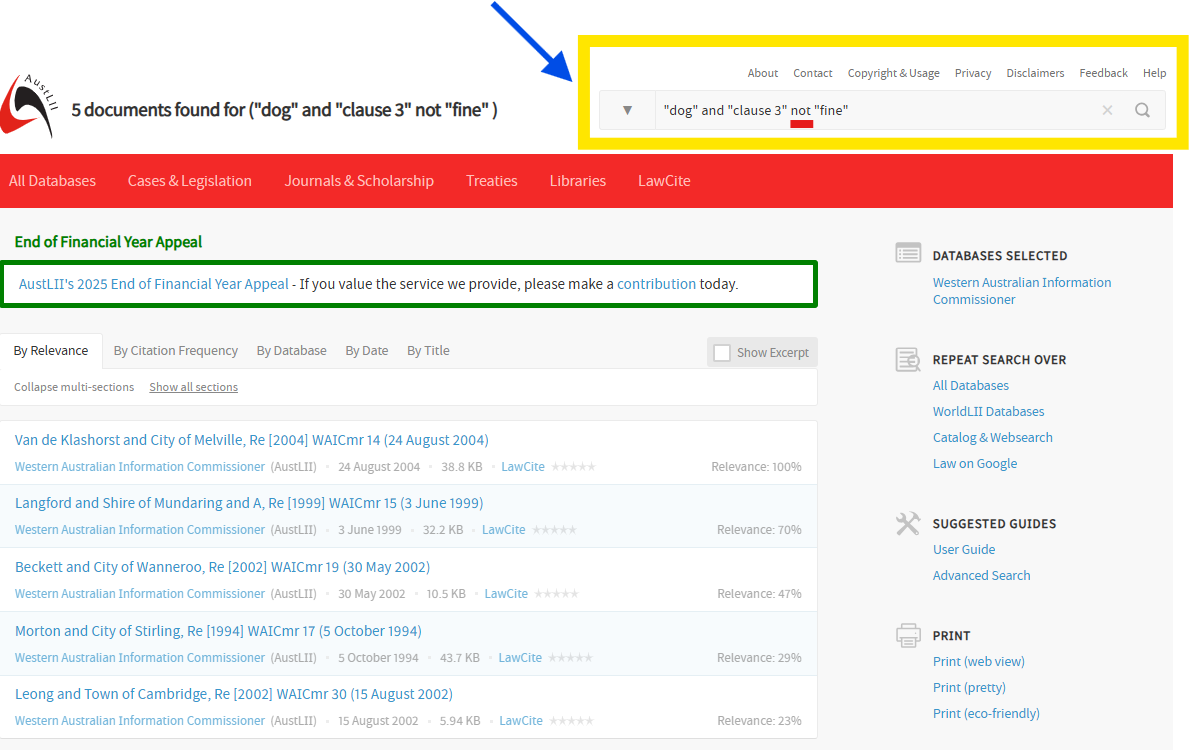
(note: the decision that included "dog" and "clause 3" and "fine" in the earlier search above does not appear in the list)
Step 4 - Display of Database search results
Show moreYou can filter the way the search results are displayed.
You can also see an excerpt of the decision if you select [Show Excerpt]

By Relevance
The default results display is by order of likely relevance to the search request with the most relevant being displayed first. The percentage ranking (‘relevance ranking’) next to each document shows 100% for the first document if it contains all search terms. All others are ranked pro-rata to that document according to the number, frequency and location of the search terms they contain.
By Citation Frequency
Results are sorted by the frequency with which items (cases, journal articles, treaties or law reform reports) are cited in the LawCite citator. The LawCite logo following each search result item is a link to that items’ citation record in LawCite. The number of stars (1-5) indicates the frequency with which the item is cited.
By Date
You can search for results in date order, most recent date displayed first (reverse chronological order).
By Title
Your search results can be sorted alphabetically by the title of the document, and displayed from A-Z.
Other Search pathways in AustLII
Show moreSearch for decisions starting with the section of the FOI Act
Go to

- Select on the section you are interested in - e.g. section 26
- On the right-hand side of the page, under the heading "Cited by" select on "NoteUp References" this will then take you to cases that refer to section 26

- You can sort the search results by Relevance; Citation Frequency; Database; Date; Title etc
- This may give access to decisions of other Courts that have considered that provisions (eg Supreme Court).
- This search method is useful only for the sections of the FOI Act or the Schedules or Glossary in their entirety. Unfortunately, this search does not work for specific exemption clauses in schedule 1 as they are not individually hyperlinked in the AustLII version of the legislation
If you search using the FOI Act, then an additional option becomes relevant to Display search results. In addition to 'by relevance / citation frequency' etc there is also:
- By Database
- Your search results can be sorted by database (often jurisdiction) eg Western Australian Information Commissioner, Supreme Court of Western Australia, Western Australian Current Acts (may have other databases if the decision refers to legislation from another jurisdiction or if a provisions in the legislation was considered elsewhere).
Search for decisions starting with a decision citation
- In the search box type the medium neutral citation, eg [2008] WAICmr 50
- You can then select on the link to that decision
- On the right-hand side of the page, under the heading "Cited by" select on "NoteUp References" this will then take you to other decisions that refer to that decision

